I'm still using a PC with XP Pro.
A website I need to use will only work with IE 8 on my machine. It has pop ups that load educational material and while to pop ups open the text and links do not using Chrome or FireFox ..
I have done everything I can think of in settings and yet .. nothing worked ..
Any ideas?
Windows XP -PRO question
Moderator: Wiz Feinberg
-
Bo Borland

- Posts: 3993
- Joined: 20 Dec 1999 1:01 am
- Location: South Jersey -
Windows XP -PRO question
Last edited by Bo Borland on 15 Feb 2017 8:34 am, edited 1 time in total.
-
Wiz Feinberg

- Posts: 6113
- Joined: 8 Jan 1999 1:01 am
- Location: Mid-Michigan, USA
You can allow popups in Firefox by opening Options > Content > Popups. There is a checkbox to allow or block popups, with a button to allow exceptions to its right.
"Wiz" Feinberg, Moderator SGF Computers Forum
Security Consultant
Twitter: @Wizcrafts
Main web pages: Wiztunes Steel Guitar website | Wiz's Security Blog | My Webmaster Services | Wiz's Security Blog
Security Consultant
Twitter: @Wizcrafts
Main web pages: Wiztunes Steel Guitar website | Wiz's Security Blog | My Webmaster Services | Wiz's Security Blog
-
Bo Borland
- Posts: 3993
- Joined: 20 Dec 1999 1:01 am
- Location: South Jersey -
Hi Wiz,
yes i did that on both Chrome and Firefox.. I also tried different SSL settings . It's a HTTPS: site
In Chrome the pop up window opens but no content shows up .
In Firefox the pop also opens and does populate.
I had to uninstall IE 10 and 9 and revert to IE 8 and it still doesn't work.
I was told it only worked on older versions of Windows and IE. No Android or MAC either ..
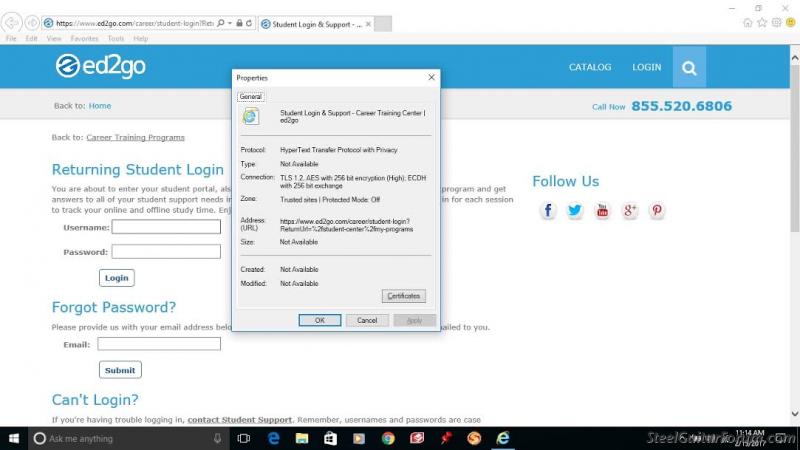
Strangely , it does work on a lap top with Windows 10 and IE 11
Here is a screen shot from the Lap top
yes i did that on both Chrome and Firefox.. I also tried different SSL settings . It's a HTTPS: site
In Chrome the pop up window opens but no content shows up .
In Firefox the pop also opens and does populate.
I had to uninstall IE 10 and 9 and revert to IE 8 and it still doesn't work.
I was told it only worked on older versions of Windows and IE. No Android or MAC either ..
Strangely , it does work on a lap top with Windows 10 and IE 11
Here is a screen shot from the Lap top
-
Wiz Feinberg
- Posts: 6113
- Joined: 8 Jan 1999 1:01 am
- Location: Mid-Michigan, USA
It is possible that your security program is blocking popups in your browsers.
"Wiz" Feinberg, Moderator SGF Computers Forum
Security Consultant
Twitter: @Wizcrafts
Main web pages: Wiztunes Steel Guitar website | Wiz's Security Blog | My Webmaster Services | Wiz's Security Blog
Security Consultant
Twitter: @Wizcrafts
Main web pages: Wiztunes Steel Guitar website | Wiz's Security Blog | My Webmaster Services | Wiz's Security Blog