Windows 7 and Audacity-Help
Moderator: Wiz Feinberg
-
Henry Matthews

- Posts: 4069
- Joined: 7 Mar 2002 1:01 am
- Location: Texarkana, Ark USA
- State/Province: -
- Country: United States
Windows 7 and Audacity-Help
Just had Windows seven installed on my home computer and now, no matter what I do, Audacity doesn't work like it did. I was able to record to audacity from Youtube, my recording board, a CD and Audacity had the option to pick source. Now it shows no option and I keep getting this squealing feedback loop every time I record. I have a Realtek sound card and a foxconn mother board. If anyone has had this problem a a solution, I would appreciate the help.---Henry
Henry Matthews
D-10 1974 Emmons cut tail, fat back,rosewood, 8&5
Nashville 112 amp, Fishman Loudbox Performer amp, Hilton pedal, Goodrich pedal,BJS bar, Kyser picks, Live steel Strings. No effects, doodads or stomp boxes.
D-10 1974 Emmons cut tail, fat back,rosewood, 8&5
Nashville 112 amp, Fishman Loudbox Performer amp, Hilton pedal, Goodrich pedal,BJS bar, Kyser picks, Live steel Strings. No effects, doodads or stomp boxes.
-
Jack Stoner

- Posts: 22147
- Joined: 3 Dec 1999 1:01 am
- Location: Kansas City, MO
- State/Province: Kansas
- Country: United States
Do you have the correct sound drivers? That's the first issue. If you had XP before, the XP drivers are not compatible. If you had Vista the Vista drivers should be compatible and Win 7 usually will install drivers during the install (if you are connected to the Internet).
Assuming the sound drivers are OK, the next step is to see if you have the System Mixer installed and set as default playback device. Go to Control Panel/Hardware and Sound and finally Sound. Click the Recording Tab and see if System Mixer is shown as one of the "Recording" devices. If it is, LEFT click on it and then click "Set Default". If the System Mixer is not shown, RIGHT click in a blank spot in that Panel and then Click "Show Disabled Devices" and Show Disconnected Devices". If the System Mixer now appears RIGHT click and select Enable. The set it as Defaul as previously noted.
If the System Mixer is not available, you will need to find a Sound Driver that includes that. Check the Foxconn site (assuming you have a Retail Foxconn motherboard)for a Win 7 driver and install it as Windows may not have installed the right driver.
If the Foxconn motherboard you have is a Vendor board such as Dell (Dell uses a lot of Foxconn motherboards) you will need the Dell driver for proper operation. If it is a Dell PC, I need the Model Number, such as Dimension 5150, XPS700, etc. so I can check the Dell downloads for that model to see if Vista/Win 7 are supported.
Post back with results or more info.
Assuming the sound drivers are OK, the next step is to see if you have the System Mixer installed and set as default playback device. Go to Control Panel/Hardware and Sound and finally Sound. Click the Recording Tab and see if System Mixer is shown as one of the "Recording" devices. If it is, LEFT click on it and then click "Set Default". If the System Mixer is not shown, RIGHT click in a blank spot in that Panel and then Click "Show Disabled Devices" and Show Disconnected Devices". If the System Mixer now appears RIGHT click and select Enable. The set it as Defaul as previously noted.
If the System Mixer is not available, you will need to find a Sound Driver that includes that. Check the Foxconn site (assuming you have a Retail Foxconn motherboard)for a Win 7 driver and install it as Windows may not have installed the right driver.
If the Foxconn motherboard you have is a Vendor board such as Dell (Dell uses a lot of Foxconn motherboards) you will need the Dell driver for proper operation. If it is a Dell PC, I need the Model Number, such as Dimension 5150, XPS700, etc. so I can check the Dell downloads for that model to see if Vista/Win 7 are supported.
Post back with results or more info.
-
Mitch Drumm
- Posts: 2663
- Joined: 4 Aug 1998 11:00 pm
- Location: Frostbite Falls, hard by Veronica Lake
- State/Province: -
- Country: United States
Re: Windows 7 and Audacity-Help
I am using Realtek onboard sound on Windows 7 and can record from Youtube or any other source. Here is a pic of the settings I have chosen in Audacity/Edit/Preferences menu on the device tab. The other tabs are set at defaults.Henry Matthews wrote:Just had Windows seven installed on my home computer and now, no matter what I do, Audacity doesn't work like it did. I was able to record to audacity from Youtube, my recording board, a CD and Audacity had the option to pick source. Now it shows no option and I keep getting this squealing feedback loop every time I record. I have a Realtek sound card and a foxconn mother board. If anyone has had this problem a a solution, I would appreciate the help.---Henry

-
Henry Matthews
- Posts: 4069
- Joined: 7 Mar 2002 1:01 am
- Location: Texarkana, Ark USA
- State/Province: -
- Country: United States
Thanks guys, I'll try those and Mitch, I don't have that option show up on mine on the box that has recording. all mine has is (Microsoft Sound Mapper - input) and Line in Realtek. Mine doesn't have stereo mix under it. Jack, here's all mine show at that point.
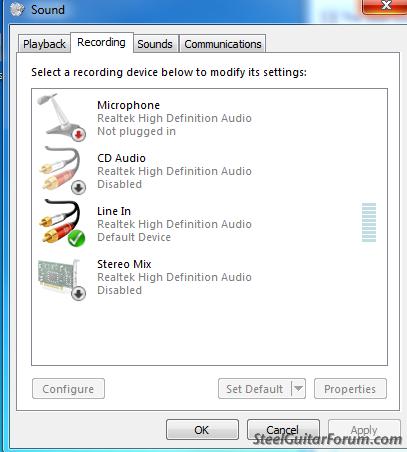 Thanks---Henry
Thanks---HenryHenry Matthews
D-10 1974 Emmons cut tail, fat back,rosewood, 8&5
Nashville 112 amp, Fishman Loudbox Performer amp, Hilton pedal, Goodrich pedal,BJS bar, Kyser picks, Live steel Strings. No effects, doodads or stomp boxes.
D-10 1974 Emmons cut tail, fat back,rosewood, 8&5
Nashville 112 amp, Fishman Loudbox Performer amp, Hilton pedal, Goodrich pedal,BJS bar, Kyser picks, Live steel Strings. No effects, doodads or stomp boxes.
-
Mitch Drumm
- Posts: 2663
- Joined: 4 Aug 1998 11:00 pm
- Location: Frostbite Falls, hard by Veronica Lake
- State/Province: -
- Country: United States
If you right click stereo mix in that window you posted and get a green checkmark on it, you should then be able to see stereo mix as choice in the "recording' area of Audacity/edit/preferences (instead of just Microsoft sound mapper- input).Henry Matthews wrote:Thanks guys, I'll try those and Mitch, I don't have that option show up on mine on the box that has recording. all mine has is (Microsoft Sound Mapper - input) and Line in Realtek. Mine doesn't have stereo mix under it. Jack, here's all mine show at that point.
That should let you record from youtube.
Don't know if it will help you record from other sources.
Presumably, you have to change the Audacity settings, depending on what you are trying to record from.
-
Henry Matthews
- Posts: 4069
- Joined: 7 Mar 2002 1:01 am
- Location: Texarkana, Ark USA
- State/Province: -
- Country: United States
Wow, it works now. Thanks a 1,000,000. Now I think I can configue it with my VS2480 Roland to master songs without a feedback loop. I had my computer, when it was XP, set up to record a track from my computer like Band in a Box, finish the song and then master it to Audacity without unplugging anything but now it gets a feedback loop when I try to do that. I think mabe now I can figure out how to do it, if not will be hollering back. Thanks guys again---Henry
Henry Matthews
D-10 1974 Emmons cut tail, fat back,rosewood, 8&5
Nashville 112 amp, Fishman Loudbox Performer amp, Hilton pedal, Goodrich pedal,BJS bar, Kyser picks, Live steel Strings. No effects, doodads or stomp boxes.
D-10 1974 Emmons cut tail, fat back,rosewood, 8&5
Nashville 112 amp, Fishman Loudbox Performer amp, Hilton pedal, Goodrich pedal,BJS bar, Kyser picks, Live steel Strings. No effects, doodads or stomp boxes.
-
Mitch Drumm
- Posts: 2663
- Joined: 4 Aug 1998 11:00 pm
- Location: Frostbite Falls, hard by Veronica Lake
- State/Province: -
- Country: United States
-
Henry Matthews
- Posts: 4069
- Joined: 7 Mar 2002 1:01 am
- Location: Texarkana, Ark USA
- State/Province: -
- Country: United States
I just exactly what you told me by right click to enable stereo mix in preferences and worked like a champ. Computers aren't my friends,LOL
Henry Matthews
D-10 1974 Emmons cut tail, fat back,rosewood, 8&5
Nashville 112 amp, Fishman Loudbox Performer amp, Hilton pedal, Goodrich pedal,BJS bar, Kyser picks, Live steel Strings. No effects, doodads or stomp boxes.
D-10 1974 Emmons cut tail, fat back,rosewood, 8&5
Nashville 112 amp, Fishman Loudbox Performer amp, Hilton pedal, Goodrich pedal,BJS bar, Kyser picks, Live steel Strings. No effects, doodads or stomp boxes.
-
Jack Stoner
- Posts: 22147
- Joined: 3 Dec 1999 1:01 am
- Location: Kansas City, MO
- State/Province: Kansas
- Country: United States