Mac.... browsing jpegs in a folder
Moderator: Wiz Feinberg
-
Bruce Wutzke
- Posts: 201
- Joined: 24 Dec 1998 1:01 am
- Location: Marion, Iowa
- State/Province: Iowa
- Country: United States
Mac.... browsing jpegs in a folder
Is there a way to do this? I seem to have to open a pic and then close it to open the next one. On the PC, windows Picture and Fax Viewer allows you to advance right through the entire contents.
-
Brad Bechtel

- Moderator
- Posts: 8559
- Joined: 4 Aug 1998 11:00 pm
- Location: San Francisco, CA
- State/Province: California
- Country: United States
I'm assuming you're trying to use the Finder to view the images, and not using iPhoto.
If you have the latest version of the Macintosh OS installed (10.5.x), there's a button in the Finder window that allows you to preview all kinds of files and to switch between the files using a slider. It's the same technology as used in Cover Flow in iTunes.
Previous versions of Mac OS X (10.4 and earlier) don't have that feature. I'd recommend Graphic Converter.
If you have the latest version of the Macintosh OS installed (10.5.x), there's a button in the Finder window that allows you to preview all kinds of files and to switch between the files using a slider. It's the same technology as used in Cover Flow in iTunes.
Previous versions of Mac OS X (10.4 and earlier) don't have that feature. I'd recommend Graphic Converter.
Brad’s Page of Steel
A web site devoted to acoustic & electric lap steel guitars
A web site devoted to acoustic & electric lap steel guitars
-
Jeff Agnew
- Posts: 741
- Joined: 18 Sep 1998 12:01 am
- Location: Dallas, TX
- State/Province: Texas
- Country: United States
If you're using Leopard, open the folder and highlight all the pics (CMD-A), then press the space bar. A preview window opens, containing controls to view pics individually or to launch a slide show.
If you're not using Leopard, you'll need to use a free or shareware graphics program to view pics sequentially. Graphic Converter is superb but no longer free. Well worth the reasonable price, though.
JView lets you drag and drop folders for viewing the pics within.
Here are some other freeware or shareware image browser programs:
If you're not using Leopard, you'll need to use a free or shareware graphics program to view pics sequentially. Graphic Converter is superb but no longer free. Well worth the reasonable price, though.
JView lets you drag and drop folders for viewing the pics within.
Here are some other freeware or shareware image browser programs:
-
Bruce Wutzke
- Posts: 201
- Joined: 24 Dec 1998 1:01 am
- Location: Marion, Iowa
- State/Province: Iowa
- Country: United States
-
Cal Sharp

- Posts: 2874
- Joined: 4 Aug 1998 11:00 pm
- Location: the farm in Kornfield Kounty, TN
- State/Province: Tennessee
- Country: United States
Hey Bruce,
You can also select all the pictures (Command + A) and drag them to the Preview icon in the dock. Preview will open them with various ways to view them.
If you want to delete some in Preview, do it by selecting the picture and pressing Command + Delete.
You can also select all the pictures (Command + A) and drag them to the Preview icon in the dock. Preview will open them with various ways to view them.
If you want to delete some in Preview, do it by selecting the picture and pressing Command + Delete.
C#
Me: Steel Guitar Madness
Latest ebook: Steel Guitar Insanity
Custom Made Covers for Steel Guitars & Amps at Sharp Covers Nashville
Me: Steel Guitar Madness
Latest ebook: Steel Guitar Insanity
Custom Made Covers for Steel Guitars & Amps at Sharp Covers Nashville
-
Ben Lowengard
- Posts: 2
- Joined: 16 Mar 2008 9:57 am
- Location: Belmont, MA
- State/Province: Massachusetts
- Country: United States
also, In tiger
Sorry to be late to posting this...but for future reference...
IF you select a bunch of jpegs you can view them as a slideshow...
THis can be done with spotlight, do a search for jpgs, select all
and right click (control click for you 1 button mouse fans) to
select view as slide show.
In Leopard- selecting anything and hitting the spacebar- opens it it quickview,
an awesome feature of Leopard -very useful.
-ben
IF you select a bunch of jpegs you can view them as a slideshow...
THis can be done with spotlight, do a search for jpgs, select all
and right click (control click for you 1 button mouse fans) to
select view as slide show.
In Leopard- selecting anything and hitting the spacebar- opens it it quickview,
an awesome feature of Leopard -very useful.
-ben
"If you appreciate the tuning so much... I hope you enjoy the playing more."
-Ravi Shankar
-Ravi Shankar
-
Joe Butcher

- Posts: 370
- Joined: 2 May 2007 7:04 am
- Location: Dallas,Texas, USA
- State/Province: Texas
- Country: United States
Actually, if you have Leopard, you can view any folder items in "cover flow" much the way you can see CD covers in iTunes.
At the top left of the finder window, you will see four little boxes for selecting how you want to view your files: icons, list, columns, or cover flow.
Its the last box on the right. If you make the finder window bigger, the pics get bigger too.
Thats easier than selecting and viewing in quickview.
At the top left of the finder window, you will see four little boxes for selecting how you want to view your files: icons, list, columns, or cover flow.
Its the last box on the right. If you make the finder window bigger, the pics get bigger too.
Thats easier than selecting and viewing in quickview.
-
Cal Sharp
- Posts: 2874
- Joined: 4 Aug 1998 11:00 pm
- Location: the farm in Kornfield Kounty, TN
- State/Province: Tennessee
- Country: United States
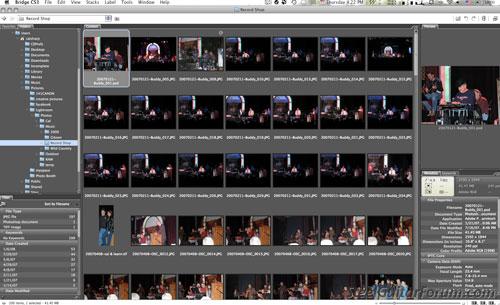
Adobe Bridge
I realize that most people won't have Adobe Creative Suites (Photoshop, Dreamweaver, etc.) unless they're a graphics pro, but it has an app named Bridge that is THE coolest way to browse pictures, or any folder. I only say this because even though I've had Adobe CS since it came out I just recently comprehended how powerful Bridge is. (It must be a lot better than previous versions, or I would have been using it all along... or I woulda thunk I would.)
C#
Me: Steel Guitar Madness
Latest ebook: Steel Guitar Insanity
Custom Made Covers for Steel Guitars & Amps at Sharp Covers Nashville
Me: Steel Guitar Madness
Latest ebook: Steel Guitar Insanity
Custom Made Covers for Steel Guitars & Amps at Sharp Covers Nashville