I mac question...
Moderator: Wiz Feinberg
-
David Wright

- Posts: 5362
- Joined: 4 Aug 1998 11:00 pm
- Location: Pilot Point ,Tx USA.
- State/Province: -
- Country: United States
I mac question...
my I Mac is really slow lately loading web pages, Im useing Firefox...I have a Dell next to it, and it loades much faster...any help???
-
Cal Sharp

- Posts: 2874
- Joined: 4 Aug 1998 11:00 pm
- Location: the farm in Kornfield Kounty, TN
- State/Province: Tennessee
- Country: United States
Heya Big D,
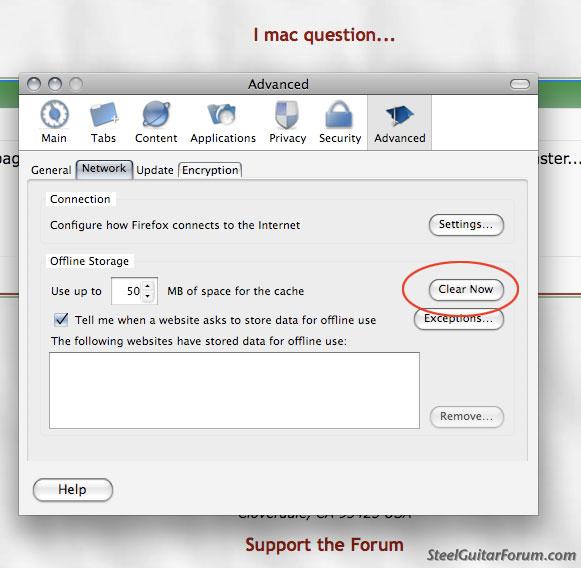
Launch Safari just to see if it's any faster. If it isn't, the problem might be with your internet connection somewhere. If it is, relaunch Firefox and see if that helps. If not, empty the cache in FF prefs. If that doesn't do it, reboot the comp.

Launch Safari just to see if it's any faster. If it isn't, the problem might be with your internet connection somewhere. If it is, relaunch Firefox and see if that helps. If not, empty the cache in FF prefs. If that doesn't do it, reboot the comp.
C#
Me: Steel Guitar Madness
Latest ebook: Steel Guitar Insanity
Custom Made Covers for Steel Guitars & Amps at Sharp Covers Nashville
Me: Steel Guitar Madness
Latest ebook: Steel Guitar Insanity
Custom Made Covers for Steel Guitars & Amps at Sharp Covers Nashville
-
David Wright
- Posts: 5362
- Joined: 4 Aug 1998 11:00 pm
- Location: Pilot Point ,Tx USA.
- State/Province: -
- Country: United States
 your pic is a bit blury..
-
Cal Sharp
- Posts: 2874
- Joined: 4 Aug 1998 11:00 pm
- Location: the farm in Kornfield Kounty, TN
- State/Province: Tennessee
- Country: United States
Click on Firefox, in the upper left hand corner, and then on Preferences and then click on Advanced.
C#
Me: Steel Guitar Madness
Latest ebook: Steel Guitar Insanity
Custom Made Covers for Steel Guitars & Amps at Sharp Covers Nashville
Me: Steel Guitar Madness
Latest ebook: Steel Guitar Insanity
Custom Made Covers for Steel Guitars & Amps at Sharp Covers Nashville
-
David Wright
- Posts: 5362
- Joined: 4 Aug 1998 11:00 pm
- Location: Pilot Point ,Tx USA.
- State/Province: -
- Country: United States
-
Cal Sharp
- Posts: 2874
- Joined: 4 Aug 1998 11:00 pm
- Location: the farm in Kornfield Kounty, TN
- State/Province: Tennessee
- Country: United States
Take the Internet cable out of the Dell and plug it into the iMac and see what happens.
C#
Me: Steel Guitar Madness
Latest ebook: Steel Guitar Insanity
Custom Made Covers for Steel Guitars & Amps at Sharp Covers Nashville
Me: Steel Guitar Madness
Latest ebook: Steel Guitar Insanity
Custom Made Covers for Steel Guitars & Amps at Sharp Covers Nashville
-
David Wright
- Posts: 5362
- Joined: 4 Aug 1998 11:00 pm
- Location: Pilot Point ,Tx USA.
- State/Province: -
- Country: United States
 just where do I go to remove firefox, I haven't had to remove anything from this thing since I got it, any other ideas why just the internet is slow.... ??
-
Cal Sharp
- Posts: 2874
- Joined: 4 Aug 1998 11:00 pm
- Location: the farm in Kornfield Kounty, TN
- State/Province: Tennessee
- Country: United States
Have you updated FF to 3.0.5? Click on the Help menu in FF and click "check for updates".
You could re-set your router by unplugging the power cords to the router and modem for about 30 seconds and then plugging the modem back in and when it establishes a connection then plug the router back in.
If you want to remove FF, just drag it from the Applications folder into the trash. Your prefs and bookmarks will still be in your user library, but that won't hurt anything. Then you could try re-installing FF, but it sounds like more of a computer or a network issue.
Is Safari slow, too?
You could re-set your router by unplugging the power cords to the router and modem for about 30 seconds and then plugging the modem back in and when it establishes a connection then plug the router back in.
If you want to remove FF, just drag it from the Applications folder into the trash. Your prefs and bookmarks will still be in your user library, but that won't hurt anything. Then you could try re-installing FF, but it sounds like more of a computer or a network issue.
Is Safari slow, too?
C#
Me: Steel Guitar Madness
Latest ebook: Steel Guitar Insanity
Custom Made Covers for Steel Guitars & Amps at Sharp Covers Nashville
Me: Steel Guitar Madness
Latest ebook: Steel Guitar Insanity
Custom Made Covers for Steel Guitars & Amps at Sharp Covers Nashville
-
David Wright
- Posts: 5362
- Joined: 4 Aug 1998 11:00 pm
- Location: Pilot Point ,Tx USA.
- State/Province: -
- Country: United States

-
John Cipriano

- Posts: 449
- Joined: 13 Jun 2008 8:23 pm
- Location: San Francisco
- State/Province: -
- Country: United States
Dave, I also think that you should check to see how Safari behaves.
If it's just as slow then it could be the network connection, especially if the Mac is on a wireless connection and it's spotty somehow.
The way you delete Firefox is to just drag it from the Applications folder to the trash. But this will leave your settings and add-ons behind, so if you uninstall and reinstall it won't make a big difference.
You can check your add-ons, too. It's in Tools > Add-ons. But the thing is my guess is that something else is going on. Like maybe the Mac's hard drive is close to being full. Also Firefox can be slow on the older PowerPC iMacs. Safari should always be fast, though.
If it's just as slow then it could be the network connection, especially if the Mac is on a wireless connection and it's spotty somehow.
The way you delete Firefox is to just drag it from the Applications folder to the trash. But this will leave your settings and add-ons behind, so if you uninstall and reinstall it won't make a big difference.
You can check your add-ons, too. It's in Tools > Add-ons. But the thing is my guess is that something else is going on. Like maybe the Mac's hard drive is close to being full. Also Firefox can be slow on the older PowerPC iMacs. Safari should always be fast, though.
-
Joe Butcher

- Posts: 370
- Joined: 2 May 2007 7:04 am
- Location: Dallas,Texas, USA
- State/Province: Texas
- Country: United States
-
David Wright
- Posts: 5362
- Joined: 4 Aug 1998 11:00 pm
- Location: Pilot Point ,Tx USA.
- State/Province: -
- Country: United States