iPod - how do you typically use it?
Moderator: Wiz Feinberg
-
b0b

- Posts: 29079
- Joined: 4 Aug 1998 11:00 pm
- Location: Cloverdale, CA, USA
- State/Province: -
- Country: United States
I tried to import a CD into iTunes, and it would only let me do one song at a time. How do you import a whole CD (and preserve the track spacing)?
-𝕓𝕆𝕓- (admin) - Robert P. Lee - Recordings - Breathe - D6th - Video

-
Cal Sharp

- Posts: 2874
- Joined: 4 Aug 1998 11:00 pm
- Location: the farm in Kornfield Kounty, TN
- State/Province: Tennessee
- Country: United States
Check Preferences/Advanced/Importing/On CD Insert to set it to import the whole CD.
Every time you play a CD you can import it and eventually get em all into iTunes. Might take a few months, but that's not nearly as daunting as getting your records into iTunes, Whew!
Every time you play a CD you can import it and eventually get em all into iTunes. Might take a few months, but that's not nearly as daunting as getting your records into iTunes, Whew!
C#
Me: Steel Guitar Madness
Latest ebook: Steel Guitar Insanity
Custom Made Covers for Steel Guitars & Amps at Sharp Covers Nashville
Me: Steel Guitar Madness
Latest ebook: Steel Guitar Insanity
Custom Made Covers for Steel Guitars & Amps at Sharp Covers Nashville
-
Jack Stanton

- Posts: 2054
- Joined: 6 May 2007 7:00 am
- Location: Somewhere in the swamps of Jersey
- State/Province: -
- Country: United States
b0b,
Now let me get this right...you put this website together and keep it up and running, and you're not sure about how an ipod works?

Seriously, my ipod is one of the best gifts I ever received. I have the 80 gig, and have put all of my CD's, LP's, cassettes, and reel to reels of old PSGA shows on there with room to spare. It's amazing having your entire musical library in your pocket. You can play by albums, artists, or just leave it on shuffle.
It's like having the soundtrack to your life with you all of the time!
Now let me get this right...you put this website together and keep it up and running, and you're not sure about how an ipod works?
Seriously, my ipod is one of the best gifts I ever received. I have the 80 gig, and have put all of my CD's, LP's, cassettes, and reel to reels of old PSGA shows on there with room to spare. It's amazing having your entire musical library in your pocket. You can play by albums, artists, or just leave it on shuffle.
It's like having the soundtrack to your life with you all of the time!
-
Wiz Feinberg

- Posts: 6115
- Joined: 8 Jan 1999 1:01 am
- Location: Mid-Michigan, USA
- State/Province: Michigan
- Country: United States
HaHa. I have designed many websites and secured them against external threats, and I don't have an iPod either.Jack Stanton wrote:b0b,
Now let me get this right...you put this website together and keep it up and running, and you're not sure about how an ipod works?
:eek:
Maybe I am missing something.
"Wiz" Feinberg, Moderator SGF Computers Forum
Security Consultant
Twitter: @Wizcrafts
Main web pages: Wiztunes Steel Guitar website | Wiz's Security Blog | My Webmaster Services | Wiz's Security Blog
Security Consultant
Twitter: @Wizcrafts
Main web pages: Wiztunes Steel Guitar website | Wiz's Security Blog | My Webmaster Services | Wiz's Security Blog
-
b0b
- Posts: 29079
- Joined: 4 Aug 1998 11:00 pm
- Location: Cloverdale, CA, USA
- State/Province: -
- Country: United States
How many CDs fit in a GB of iPod storage?
-𝕓𝕆𝕓- (admin) - Robert P. Lee - Recordings - Breathe - D6th - Video
-
Cal Sharp
- Posts: 2874
- Joined: 4 Aug 1998 11:00 pm
- Location: the farm in Kornfield Kounty, TN
- State/Province: Tennessee
- Country: United States
Roughly the same number of angels that can fit on the head of a needle, about a dozen or so.
C#
Me: Steel Guitar Madness
Latest ebook: Steel Guitar Insanity
Custom Made Covers for Steel Guitars & Amps at Sharp Covers Nashville
Me: Steel Guitar Madness
Latest ebook: Steel Guitar Insanity
Custom Made Covers for Steel Guitars & Amps at Sharp Covers Nashville
-
Don Poland

- Posts: 1197
- Joined: 31 Dec 2004 1:01 am
- Location: Hanover, PA.
- State/Province: -
- Country: United States
-
b0b
- Posts: 29079
- Joined: 4 Aug 1998 11:00 pm
- Location: Cloverdale, CA, USA
- State/Province: -
- Country: United States
Would 10 CDs per GB be a good rule of thumb, then? That would mean that I could fit 1600 CDs on a 160 GB iPod. I have about 1000, I think.
-𝕓𝕆𝕓- (admin) - Robert P. Lee - Recordings - Breathe - D6th - Video
-
Cal Sharp
- Posts: 2874
- Joined: 4 Aug 1998 11:00 pm
- Location: the farm in Kornfield Kounty, TN
- State/Province: Tennessee
- Country: United States
In my iTunes Paul McCartney's "Chaos and Creation", for example, is 71.5 MB. The tracks are at a bit rate of around 200kbps, and a sampled rate of 44.100kHz. Neils Young's "Prairie Wind" is about the same.
C#
Me: Steel Guitar Madness
Latest ebook: Steel Guitar Insanity
Custom Made Covers for Steel Guitars & Amps at Sharp Covers Nashville
Me: Steel Guitar Madness
Latest ebook: Steel Guitar Insanity
Custom Made Covers for Steel Guitars & Amps at Sharp Covers Nashville
-
b0b
- Posts: 29079
- Joined: 4 Aug 1998 11:00 pm
- Location: Cloverdale, CA, USA
- State/Province: -
- Country: United States
-
Cal Sharp
- Posts: 2874
- Joined: 4 Aug 1998 11:00 pm
- Location: the farm in Kornfield Kounty, TN
- State/Province: Tennessee
- Country: United States
The black ones are for blues and jazz. And they show smudges and fingerprints really bad.
C#
Me: Steel Guitar Madness
Latest ebook: Steel Guitar Insanity
Custom Made Covers for Steel Guitars & Amps at Sharp Covers Nashville
Me: Steel Guitar Madness
Latest ebook: Steel Guitar Insanity
Custom Made Covers for Steel Guitars & Amps at Sharp Covers Nashville
-
Don Poland
- Posts: 1197
- Joined: 31 Dec 2004 1:01 am
- Location: Hanover, PA.
- State/Province: -
- Country: United States
-
David Tunnell

- Posts: 203
- Joined: 16 May 2006 12:01 am
- Location: Marshfield, Missouri, USA
- State/Province: Missouri
- Country: United States
bOb,
I have an 80 GB iPod, and it has about 27,000 songs (maybe about 2,500 CDs plus some LP records) on it, with some space left over. I am sure that you could configure the files such that each song would take more space, for improved sound, but the sound I get from my iPod is sufficient for my ears.
If I were going to buy another one, I would buy the biggest iPod that you can get, which is currently 160 GB. They cost $349, which is not all that much more than smaller ones. The 80 GB one I have now was the biggest you could get when I bought it.
Please note that, for some reason, if you buy a 160 GB iPod, you won't get quite 160 GB of space. The actual formatted space is always somewhat less than the advertised space. There is probably some reason for that, but I don't know it; I am not very computer savvy.
I have an 80 GB iPod, and it has about 27,000 songs (maybe about 2,500 CDs plus some LP records) on it, with some space left over. I am sure that you could configure the files such that each song would take more space, for improved sound, but the sound I get from my iPod is sufficient for my ears.
If I were going to buy another one, I would buy the biggest iPod that you can get, which is currently 160 GB. They cost $349, which is not all that much more than smaller ones. The 80 GB one I have now was the biggest you could get when I bought it.
Please note that, for some reason, if you buy a 160 GB iPod, you won't get quite 160 GB of space. The actual formatted space is always somewhat less than the advertised space. There is probably some reason for that, but I don't know it; I am not very computer savvy.
-
Zeek Duff

- Posts: 138
- Joined: 11 Mar 2008 4:57 pm
- Location: Longmont, Colorado, USA
- State/Province: Colorado
- Country: United States
deleting files
Hi folks, I hope this isn't a dumb question, but how do you delete files, or more precisely, playlists. We got a new iPod for my wife's use, and when we docked the thing to her Mac, it loaded all her music alright, but it seems some playlists are duplicated, several times in some instances, like '50-'60s music, show tunes, etc., and they'll have the same songs in them, taking up space. We got her an 8 GB Nano, and that 1st dump took up over half the memory. So, she would not only like to get some space back, but more importantly, get rid of the double indexing.
I'm not sure if some songs are in there twice or more, but they sure are listed more than once. We looked in iPod for Dummies and it appears their "solution" is to go back to iTunes and check what she wants to save (every single tune) and reload. But, if it did that and those other lists stayed on there, I'd be tempted to light it up for a tiny little $250 fire... Does anyone have a better solution? Puh-leeze... Hard to throw out the trash if you can't find the trash can. ':aside:'
Thanks,
...z (who is sending his new MacBook Pro back for the third time, getting a new one, long story)
I'm not sure if some songs are in there twice or more, but they sure are listed more than once. We looked in iPod for Dummies and it appears their "solution" is to go back to iTunes and check what she wants to save (every single tune) and reload. But, if it did that and those other lists stayed on there, I'd be tempted to light it up for a tiny little $250 fire... Does anyone have a better solution? Puh-leeze... Hard to throw out the trash if you can't find the trash can. ':aside:'
Thanks,
...z (who is sending his new MacBook Pro back for the third time, getting a new one, long story)
Fingerstyle guitar jazz from a nice guy,
Zeek Duff in BEAUTIFUL COLORADO
http://www.zeekduff.com
http://www.myspace.com/zeekduffmusic
http://www.cdbaby.com/zeekduff
Http://www.facebook.com/zeekduff
http://www.twitter.com/zeekduff
Zeek Duff in BEAUTIFUL COLORADO
http://www.zeekduff.com
http://www.myspace.com/zeekduffmusic
http://www.cdbaby.com/zeekduff
Http://www.facebook.com/zeekduff
http://www.twitter.com/zeekduff
-
b0b
- Posts: 29079
- Joined: 4 Aug 1998 11:00 pm
- Location: Cloverdale, CA, USA
- State/Province: -
- Country: United States
They probably use the "drivemaker's kilobyte" method for their calculations. <center>David Tunnell wrote:Please note that, for some reason, if you buy a 160 GB iPod, you won't get quite 160 GB of space. The actual formatted space is always somewhat less than the advertised space. There is probably some reason for that, but I don't know it; I am not very computer savvy.
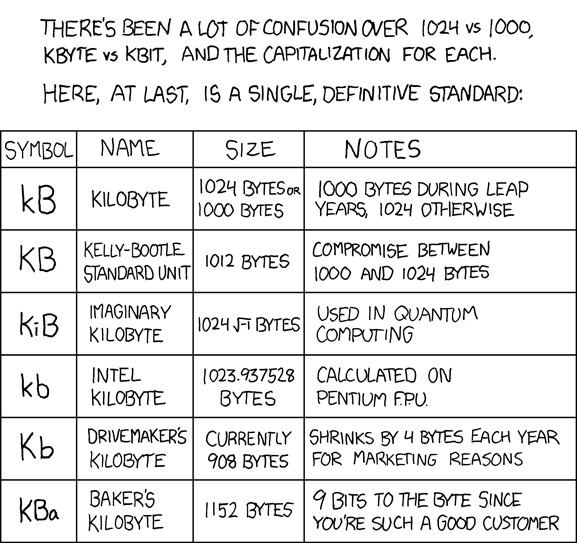
</center>

-𝕓𝕆𝕓- (admin) - Robert P. Lee - Recordings - Breathe - D6th - Video
-
David Tunnell
- Posts: 203
- Joined: 16 May 2006 12:01 am
- Location: Marshfield, Missouri, USA
- State/Province: Missouri
- Country: United States
bOb,
Thanks for that. I hope my response was helpful to you.
Zeek,
It sounds like your iPod is set to automatically update itself when it is connected to the computer. If you want to control what is copied onto the iPod and what is not, you need to "manually manage" your songs and playlists. Below is an explanation from the Apple website on how to do that. To delete things off of the iPod, you click on the song or playlist, and hit delete (this is how you do it on a PC, I presume it works the same way on a Mac). Here is Apple's explanation of how to set your iPod up so that you can "manually manage" it:
If you have iTunes 7 or later follow these instructions:
1. Connect iPod to your computer.
2. Open iTunes.
3. Select iPod in the Source pane.
4. On the Summary tab select “Manually manage music and videos” and click Apply.
When manual management is enabled, you can still sync some content automatically. Select any content tab such as Movies or TV Shows to enable automatic syncing for that type of content.
Manually copying content to your iPod
After following the steps above, you can copy individual tracks and playlists from iTunes to your iPod. Just drag the track or playlist to the iPod icon in the Source list.
Thanks for that. I hope my response was helpful to you.
Zeek,
It sounds like your iPod is set to automatically update itself when it is connected to the computer. If you want to control what is copied onto the iPod and what is not, you need to "manually manage" your songs and playlists. Below is an explanation from the Apple website on how to do that. To delete things off of the iPod, you click on the song or playlist, and hit delete (this is how you do it on a PC, I presume it works the same way on a Mac). Here is Apple's explanation of how to set your iPod up so that you can "manually manage" it:
If you have iTunes 7 or later follow these instructions:
1. Connect iPod to your computer.
2. Open iTunes.
3. Select iPod in the Source pane.
4. On the Summary tab select “Manually manage music and videos” and click Apply.
When manual management is enabled, you can still sync some content automatically. Select any content tab such as Movies or TV Shows to enable automatic syncing for that type of content.
Manually copying content to your iPod
After following the steps above, you can copy individual tracks and playlists from iTunes to your iPod. Just drag the track or playlist to the iPod icon in the Source list.
-
b0b
- Posts: 29079
- Joined: 4 Aug 1998 11:00 pm
- Location: Cloverdale, CA, USA
- State/Province: -
- Country: United States
David, it was helpful, yes, very helpful. I think I'll be getting one next week. 80 GB seems like the good size.
-𝕓𝕆𝕓- (admin) - Robert P. Lee - Recordings - Breathe - D6th - Video
-
Harry Sheppard
- Posts: 407
- Joined: 27 Aug 1998 12:01 am
- Location: Kalispell, MT USA
- State/Province: -
- Country: United States
b0b, I spent the last year copying my CDs into iTunes on my MacBook and just bought a 160GB iPod a few months ago. Set your iTunes default import setting to at least 192 kbps MP3 for a good quality sound and a reasonable size file. 128 kbps is OK to save room but any lower bit rate and the sound will be horrible. Any higher and the file size will be very large. A 192 kbps song file is 5MB to 10MB in size and sounds petty good.
If set up correctly, you will be asked if you want to import the CD into iTunes as soon as it it inserted in the drive. Click OK and the disk will be copied, converted to MP3 and stored in the iTunes Library in less than 5 minutes. After it is copied, just grab all the songs and pull them to a blank spot on the left side column and a new playlist is created with the Artist and CD name. All the song titles are created automatically in order with the spacing intact. Create Artist folders and drag the playlist into the artist folder. Create Genre folders to group similar artists. It is very easy.
Connect the ipod to the computer (which should be set to import the entire iTunes library) and let it copy. As you add or modify CDs and playlists in iTunes, all changes will automatically be made in the iPod when you plug it in the the USB port and hit update. If you delete a CD from iTunes, it will be deleted from the iPod next time you sync. You can also use uncheck the box in iTunes for songs you want to delete from the iPod but it is easier to just get a big enough iPod so you can copy the entire Library and not hassle with what to copy.
I have about 13,000 songs which takes up about 60GB. The 160GB iPod has about 148GB of actual storage space so I am working on ripping my DVD Movie collection to fill up the rest. A 2 hour movie rips to about 2.5GB and looks great on the little screen. Also, the 160GB Classic iPod is rated at a 40hr battery life. I watched 2 movies and listened to a couple of hours of music on a flight to Denver and the battery is still 3/4 charged... If your going to spend the money, get the 160GB iPod. You will be amazed at what you will find to fill it up.
The iPod touch currently come with 32MB Flash memory (no Hard Drive) max with a short battery life. It also costs $500 vs $350 for the 160MB classic.
If set up correctly, you will be asked if you want to import the CD into iTunes as soon as it it inserted in the drive. Click OK and the disk will be copied, converted to MP3 and stored in the iTunes Library in less than 5 minutes. After it is copied, just grab all the songs and pull them to a blank spot on the left side column and a new playlist is created with the Artist and CD name. All the song titles are created automatically in order with the spacing intact. Create Artist folders and drag the playlist into the artist folder. Create Genre folders to group similar artists. It is very easy.
Connect the ipod to the computer (which should be set to import the entire iTunes library) and let it copy. As you add or modify CDs and playlists in iTunes, all changes will automatically be made in the iPod when you plug it in the the USB port and hit update. If you delete a CD from iTunes, it will be deleted from the iPod next time you sync. You can also use uncheck the box in iTunes for songs you want to delete from the iPod but it is easier to just get a big enough iPod so you can copy the entire Library and not hassle with what to copy.
I have about 13,000 songs which takes up about 60GB. The 160GB iPod has about 148GB of actual storage space so I am working on ripping my DVD Movie collection to fill up the rest. A 2 hour movie rips to about 2.5GB and looks great on the little screen. Also, the 160GB Classic iPod is rated at a 40hr battery life. I watched 2 movies and listened to a couple of hours of music on a flight to Denver and the battery is still 3/4 charged... If your going to spend the money, get the 160GB iPod. You will be amazed at what you will find to fill it up.
The iPod touch currently come with 32MB Flash memory (no Hard Drive) max with a short battery life. It also costs $500 vs $350 for the 160MB classic.
-
b0b
- Posts: 29079
- Joined: 4 Aug 1998 11:00 pm
- Location: Cloverdale, CA, USA
- State/Province: -
- Country: United States
I ordered the black 80 GB model yesterday with my logo -b0b- embossed on it. I didn't see any point in getting the larger model. My Powerbook's hard drive is only 80 GB anyway.
-𝕓𝕆𝕓- (admin) - Robert P. Lee - Recordings - Breathe - D6th - Video
-
Marc Friedland

- Posts: 1045
- Joined: 26 Jan 1999 1:01 am
- Location: Fort Collins, CO
- State/Province: -
- Country: United States
Bob,
Please let me/us know if you like it and feel it’s worth the hassle of the hundreds of hours of transfer, small viewing screen, etc. Personally, it’s difficult imagining it being worth it to me, so I am truly interested in how it turns out for you. And yes, I understand many people believe the iPod is far superior to any system that has come out previously.
Not that it was ever mentioned, and I know some of you may label it as progress, but I hope they don’t stop making CD players in cars or selling CD players in the near future. There is nothing I have read on this post so far that inspires me to crawl on the iPod band wagon at this time.
Marc
Please let me/us know if you like it and feel it’s worth the hassle of the hundreds of hours of transfer, small viewing screen, etc. Personally, it’s difficult imagining it being worth it to me, so I am truly interested in how it turns out for you. And yes, I understand many people believe the iPod is far superior to any system that has come out previously.
Not that it was ever mentioned, and I know some of you may label it as progress, but I hope they don’t stop making CD players in cars or selling CD players in the near future. There is nothing I have read on this post so far that inspires me to crawl on the iPod band wagon at this time.
Marc
-
David Hartley
- Posts: 2317
- Joined: 8 Nov 2005 1:01 am
- State/Province: -
- Country: United States
Hi b0b...PLEASE READ THIS....
Hope you are well. I have just came a across this thread and see you have asked a lot of iPod questions. I can help you a bit here. I have been using iPods since day 1. and my kids too. These iPods are probably the best invention ever. They are small, quality is really good, and they are affordable and very user friendly...DONT buy another make of player...I WILL TELL YOU WHY.. Its simple, they are not as good as the iPod.. I have been there, done it and have the tee shirt.. It wont take many hours to get your 1000 CD's onto an iPpod. It doesent matter how long it takes..You will love having all that shelved music on an iPod.. I was one of the first people over here in the UK to ditch my mini disc machines and have all my backing tracks on iPod. If someone requests a song to me while I playing, I can find the requested song while the last chorus is playing and have it ready to play at an instant that playing song ends.. I know other tricks too..ie AUTO PAUSING after each track to allow time to talk and announce your next song.. You MUST NOT GET AN IPOD LOOKALIKE b0b!! Hey, theyre only $99 for a 4 gig.. Try one of these first and put your very favorite CD's on it..You must have a lot of CD's that you own but probably wont ever play much anyway..And while archiving your collection onto your MAC and iPod, you will find stuff on the shelf that you have'nt heard for years too.. I own 5 iPods, I was always worried about them failing at a gig, or batteries running down, After 2 years of using them on the road I now know that 2 would have been enough. I only have around 300 backing tracks, therefore only have 2 gig and 4 gig iPods.. You would need an 160gig for your collection.. OH and there's ONLY ONE iPOD DOCK WORTH BUYING TOO if you want to pack up your hi-fi and its the BOSE... Expensive but you can fill a HOUSE with sound... email me if you want more advice..I do have a LOT of experience with them..Love the forum, DAVID
OH BOB.. I bumped into this thread as was I was going to ask..? ANIMATED AVATARS? Do you think theres going to be hundreds popping up now? Is it a good or bad thing? Kinda distracting I think.. I like to see faces so you know who you are posting too..Do you agree?
Very best regards b0b, from David Hartley
OH BOB.. I bumped into this thread as was I was going to ask..? ANIMATED AVATARS? Do you think theres going to be hundreds popping up now? Is it a good or bad thing? Kinda distracting I think.. I like to see faces so you know who you are posting too..Do you agree?
Very best regards b0b, from David Hartley
-
b0b
- Posts: 29079
- Joined: 4 Aug 1998 11:00 pm
- Location: Cloverdale, CA, USA
- State/Province: -
- Country: United States
Okay, here's the update.
I bought a black 80 GB iPod Classic. From the tracking number I followed its progress from China (where I assume the -b0b- engraving was done) through Alaska, Chicago and Oakland. It arrived as scheduled and looked beautiful.
Anxiously, I connected it to my PowerBook G4, only to discover that it was incompatible with OS X 10.3.9. It requires 10.4 (Tiger) as a minimum.
Apple's web site no longer sells Tiger because they want everyone to upgrade to 10.5 (Leopard). I'm very hesitant to install Leopard on this 4-year-old laptop. Internet reports and personal experience with a Mac Mini are less than favorable for Leopard on older, less powerful Macs.
Luckily, I have friends, and one of them came through with a PowerPC Tiger installation disk for me. I backed up all my files to DVD-R last night, then pushed the install button on Tiger and went to bed.
This morning Tiger booted without a hitch. Anxiously, I plugged in the iPod once more, only to discover that the OS had to be updated to 10.4.11 (from 10.4.8 ) before iTunes would run. Sigh. Another 120MB download and 2 reboots later, I finally connected my iPod to iTunes.
From there on it was a breeze. The iPod sucked the tunes off my hard disk, and soon I was listening to Aaron Copland's "An American In Paris" in the earbuds. The iPod's user interface is really slick, I must confess.
I'm happy to finally get it working, but I wonder how many people get frustrated trying to get their computers up to spec for these gadgets. I know for a fact that the latest iTunes won't work with my Windows 2000 workhorse - they've dropped support for anything older than XP - but I was shocked that it didn't support a Mac OS version that was only a couple of years old. If I didn't have a broadband connection, I'll still be in upgrade hell.
As for sound quality, the earbuds faithfully reproduce the trashing of high frequencies induced by mp3 compression. I think I'm going to have to get a good docking station with speakers to smooth things out a bit. I can't take it directly to the ears with so little air and ambiance. I saw a Bose in a store that sounded pretty decent. Probably costs more than the iPod, though.
I bought a black 80 GB iPod Classic. From the tracking number I followed its progress from China (where I assume the -b0b- engraving was done) through Alaska, Chicago and Oakland. It arrived as scheduled and looked beautiful.
Anxiously, I connected it to my PowerBook G4, only to discover that it was incompatible with OS X 10.3.9. It requires 10.4 (Tiger) as a minimum.
Apple's web site no longer sells Tiger because they want everyone to upgrade to 10.5 (Leopard). I'm very hesitant to install Leopard on this 4-year-old laptop. Internet reports and personal experience with a Mac Mini are less than favorable for Leopard on older, less powerful Macs.
Luckily, I have friends, and one of them came through with a PowerPC Tiger installation disk for me. I backed up all my files to DVD-R last night, then pushed the install button on Tiger and went to bed.
This morning Tiger booted without a hitch. Anxiously, I plugged in the iPod once more, only to discover that the OS had to be updated to 10.4.11 (from 10.4.8 ) before iTunes would run. Sigh. Another 120MB download and 2 reboots later, I finally connected my iPod to iTunes.
From there on it was a breeze. The iPod sucked the tunes off my hard disk, and soon I was listening to Aaron Copland's "An American In Paris" in the earbuds. The iPod's user interface is really slick, I must confess.
I'm happy to finally get it working, but I wonder how many people get frustrated trying to get their computers up to spec for these gadgets. I know for a fact that the latest iTunes won't work with my Windows 2000 workhorse - they've dropped support for anything older than XP - but I was shocked that it didn't support a Mac OS version that was only a couple of years old. If I didn't have a broadband connection, I'll still be in upgrade hell.
As for sound quality, the earbuds faithfully reproduce the trashing of high frequencies induced by mp3 compression. I think I'm going to have to get a good docking station with speakers to smooth things out a bit. I can't take it directly to the ears with so little air and ambiance. I saw a Bose in a store that sounded pretty decent. Probably costs more than the iPod, though.
-𝕓𝕆𝕓- (admin) - Robert P. Lee - Recordings - Breathe - D6th - Video
-
Earnest Bovine

- Posts: 8370
- Joined: 4 Aug 1998 11:00 pm
- Location: Los Angeles CA USA
- State/Province: -
- Country: United States
-
b0b
- Posts: 29079
- Joined: 4 Aug 1998 11:00 pm
- Location: Cloverdale, CA, USA
- State/Province: -
- Country: United States
-
David Hartley
- Posts: 2317
- Joined: 8 Nov 2005 1:01 am
- State/Province: -
- Country: United States
b0b
Glad you got iPod working OK.. I don't understand apple software and applemac computors but am glad you have it working... Don't get ANYTHING other than a BOSE dock!! Its the only one to get...BUT make sure it has the docking adaptor for your 80gig iPod (there's a few usually supplied so that all iPods can dock without FLOPPING about on the connections!!
David
No you have all that music to put on your iPod, I can post all my threads in the wrong place on the forum and you wont have time to see!!!!
David
No you have all that music to put on your iPod, I can post all my threads in the wrong place on the forum and you wont have time to see!!!!